Truck wheel visualizer: see custom wheels on your lifted or stock truck before you buy
A wheel and tire package for a truck is a four-figure decision, and trucks are the easiest vehicles to get wrong from a product photo. Here's how to see the set on your own truck first — free, in your browser.
Lifted, leveled or stock: the render keeps your stance
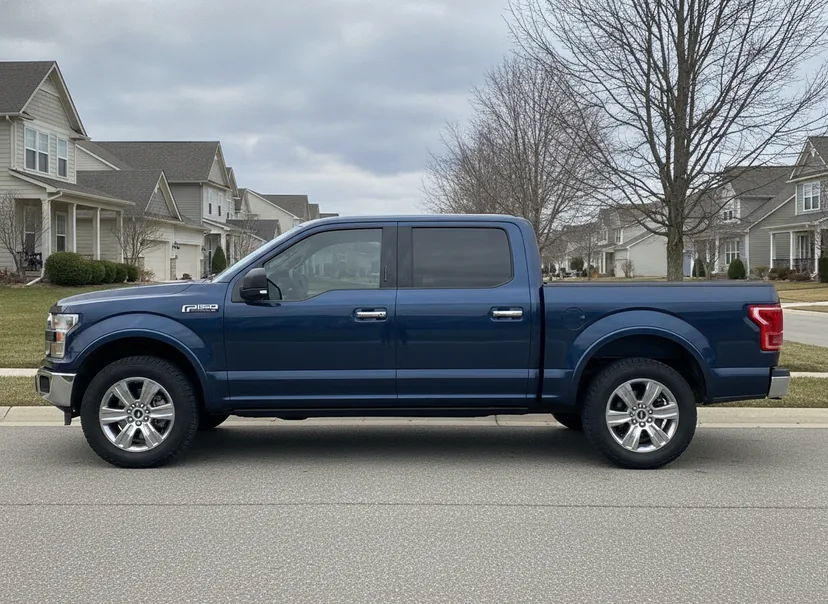
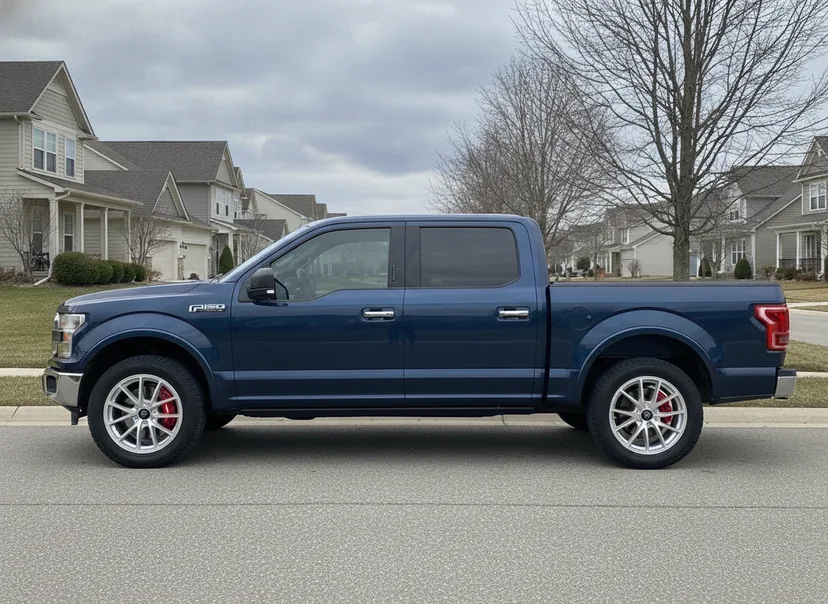
Drag the line. Actual WheelPeek output on an AI-generated demo F-150, re-rendered with Forged Metallics FM01 Stratos in bright silver — the same ten-second pipeline that runs on a photo of your own truck.
WheelPeek renders onto your photo exactly as you shot it, so your truck's ride height, stance and tires all stay in the picture: a leveled crew cab still looks leveled and a lifted truck still looks lifted, with the new wheels dropped into that scene instead of onto a generic studio truck. That matters more on a truck than on almost anything else, because the same wheel reads completely differently at stock height than it does on a six-inch lift riding on 35s. One honest limit — the render shows the wheels on the truck as it sits today; it does not add a lift or change your tire size, so if a lift or a taller tire is part of the plan, judge the wheel design, finish and stance here and confirm ride height, tire size and clearance separately.
Why truck wheels are the hardest to guess
A wheel that looks perfect on a product page can disappear on a truck. Trucks have more body, more fender gap and more sidewall than anything else on the road, and all three change how a wheel reads:
- Scale. A design that looks aggressive at 18×8 on a sedan can look lost inside a full-size truck's arches. Spoke count and lip depth read completely differently at truck proportions.
- Stance and lift. A leveled or lifted truck shows the wheel from further away and at a steeper angle. Concave faces and negative-offset setups that poke past the fender only make sense when you see them on your ride height.
- Finish against the body. Matte black on a white F-150, machined faces on a dark Silverado, bronze on an army-green Tacoma — the body colour decides whether a finish pops or vanishes, and a studio shot on white background tells you nothing about it.
The fix is the same as for any car, but it matters more on a truck: put the wheel on your actual truck before you spend a cent.
See wheels on your own truck, step by step
WheelPeek runs free in your browser during the public beta — nothing to install and no account for your first five renders. The whole flow takes a couple of minutes:
- Open the beta at wheelpeek.com/app on your phone or computer.
- Snap or import a photo of your truck. A front three-quarter shot that shows the whole truck and both visible wheels renders best; stand back far enough that the fenders aren't cropped.
- Let the AI read the truck. It identifies the make, model, bolt pattern and OEM wheel sizes, then finds the wheels in your photo automatically. Leveled or lifted? Set a custom fitment override so the scoring matches your build.
- Browse the catalog — 1,600+ wheels from 30 brands overall, with a small but growing truck selection (around 35 truck-pattern wheels across seven brands today, including designs from brands like Method Race Wheels) — and FITS badges flagging what suits your bolt pattern and sizes.
- Tap to render. In about ten seconds the photo becomes a photoreal HD image of your truck wearing the new set — same light, same stance, calipers visible through the spokes.
- Compare finishes side by side. Line up matte black vs machined vs bronze on a 2×2 sheet — same truck, same angle, only the wheels change — then share a numbered voting card to the group chat.
Honest note: renders are illustrative, and FITS badges and the Decision Score are estimates from manufacturer specs. For trucks especially — where load ratings, lift geometry and tire clearance matter — always verify bolt pattern, offset, width and clearance with the seller or manufacturer before ordering.
Truck fitment in 60 seconds
Truck fitment has its own vocabulary, and two numbers do most of the work:
- Bolt pattern. Most half-ton and mid-size trucks run 6-lug patterns (6×139.7 is everywhere — Silverado, Sierra, Tacoma, Titan and the current Tundra, though 2007–21 Tundras ran 5×150), F-150s from 2004 on run 6×135, and HD trucks move to 8-lug. If the pattern doesn't match, nothing else matters — our bolt pattern guide shows how to read and measure yours.
- Offset and backspacing. Truck builds run lower (often negative) offsets than car builds — that's what pushes the wheel out toward or past the fender for the wide stance. Lower offset also changes scrub radius and can rub at full lock on stock suspensions. The fitment guide covers offset, width and clearance properly.
When you render in WheelPeek, the FITS badge does the first pass for you — it checks your truck's bolt pattern and OEM size range against every wheel in the catalog, so you shortlist from wheels that can actually bolt on.
Running the numbers before you order? The free wheel offset calculator converts offset and backspacing, so you can see how far a low-offset truck wheel pushes out past the fender, and the tire size calculator compares a taller tire against your stock size — the one to watch on a leveled or lifted truck, where going much more than 3% over the factory diameter starts to read on the speedometer.
Trucks change the calculus more than any other vehicle: they carry more sidewall, more fender gap and more ride-height variation than anything else on the road, so the same wheel reads completely differently on a stock work truck than on a leveled or lifted one — and the tire, as much as the rim, defines the final look. That is exactly why a product photo fails you on a truck, and why it pays to render your shortlist on your own truck and check the numbers per vehicle: the Ford F-150 Wheel Visualizer, Chevrolet Silverado 1500 Wheel Visualizer and Ram 1500 Wheel Visualizer pages each cover the bolt pattern, OEM sizes and fitment gotchas that decide what package actually works.
Truck bolt patterns at a glance
Get the pattern right before anything else — a beautiful wheel in the wrong bolt pattern is just an expensive paperweight. Here is where the common truck patterns land, so you know what to shortlist and what to rule out:
| Bolt pattern | Common trucks |
|---|---|
6x139.7 | Silverado / Sierra 1500, Tacoma, 4Runner, Tundra 2022+, Titan, Ram 1500 DT (2019+), Bronco 2021+, Colorado / Canyon 2004–12 (4WD) |
6x120 | Colorado / Canyon 2015+ |
6x135 | F-150 2004+, Expedition |
5x139.7 | Ram 1500 DS (2009–18) and Ram 1500 Classic |
5x150 | Tundra 2007–21, Land Cruiser / LX |
8x165.1 | GM HD to 2010 and Ram 2500 (still 8x165.1 today; only the Ram 3500 moved to 8x200 in 2003) |
8x180 | GM HD 2011+ |
8x170 | Ford Super Duty 1999+ |
These are starting points, not gospel — trim, model year and drivetrain shift the details, and HD trucks in particular have changed patterns over the years. Always verify the exact bolt pattern with the seller or manufacturer before you order.
The looks truck owners compare most
Four setups cover most truck builds — and they're exactly the kind of decision a visualizer settles in one sheet:
- Matte black everything. The default for a reason — but on a black or dark-grey truck it can read flat. Ten seconds on your own photo answers it.
- Machined face with black windows. Adds contrast on dark paint; can look busy on lighter colours.
- Bronze. The scene favourite on white, grey and green trucks — and the finish people most often chicken out of without seeing it first.
- Bead-lock-style off-road designs. Ring bolts and chunky spokes look right with a lift and taller sidewall; on a stock-height street truck they can look heavier than expected.
Render your shortlist on your own truck, drag the before/after slider, and the argument settles itself.
Works on SUVs and mid-size trucks too
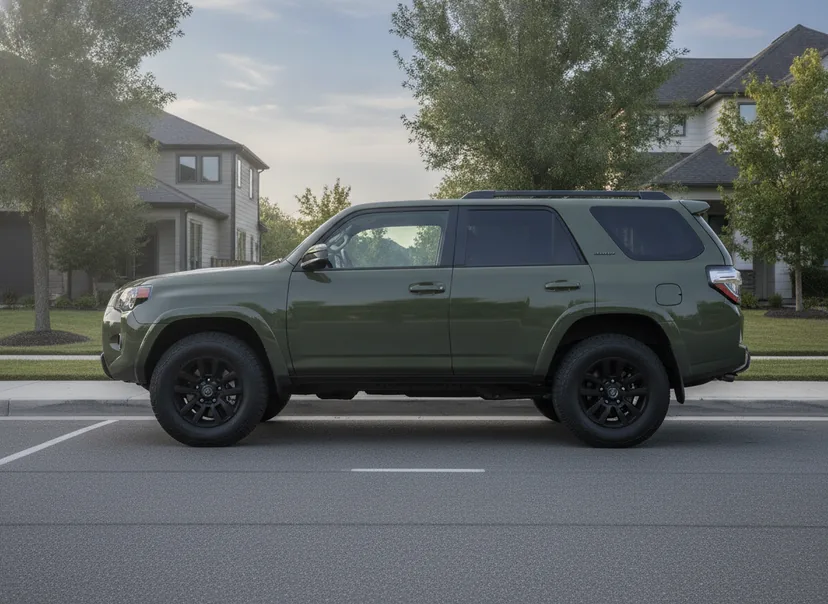
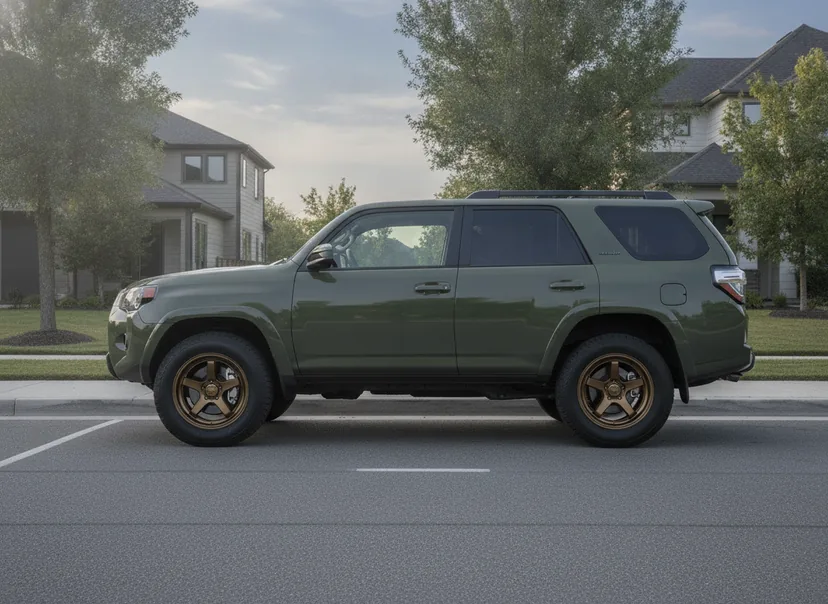
The same ten-second pipeline on an AI-generated demo 4Runner, re-rendered with Forged Metallics FM05 Ronin in gloss bronze — body-on-frame SUVs and mid-size trucks work the same way.
FAQ
Does it work on lifted trucks?
Yes. The AI renders on your photo as-is, so your lift, stance and tires stay in the picture. If your build runs non-stock sizes, set a custom fitment override so FITS badges and the Decision Score match your setup instead of factory specs.
Which trucks does it recognize?
It identifies most trucks from a single photo — F-150, Silverado, Sierra, RAM, Tacoma, Tundra, Ranger, Colorado, Frontier, Titan and more — including make, model, bolt pattern and OEM wheel sizes. If detection ever misses, you can set the fitment manually.
Is it really free?
Yes. Your first five renders need no account at all (they carry a small WheelPeek mark). Sign in with Google — no credit card — for 100 free renders during the beta, without the mark. Optional paid plans for heavy use will come after the beta; trying WheelPeek stays free.
Can it show different tires too?
WheelPeek renders the wheel on your truck in your photo — your existing tires and stance stay as shot. Tire visualization isn't part of the beta today.
Try it on your truck now
Open the free beta, snap your truck, and see your shortlist rendered on it in about ten seconds — before you spend a thousand dollars finding out the hard way. If you're deciding between sizes or offsets first, start with the fitment guide and the bolt pattern guide, or read how AI wheel visualizers actually work to see why true renders beat sticker overlays.